ASFROM Digital Shoe Marking Machine FAQ
ASFROM Digital Shoe Marking Machine FAQ
Digital Shoe Marking Machine Base Q&A
1. मूल उत्पाद जानकारी
प्रश्न 1:What is the ASP-835 Intelligent Visual Digital Printing Line Drawing Machine?
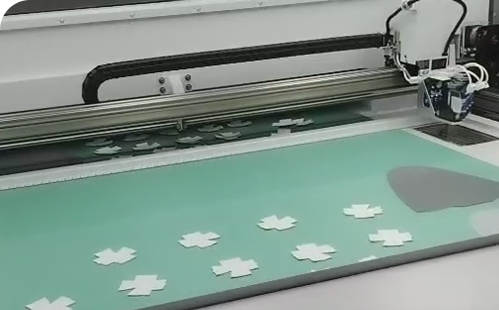
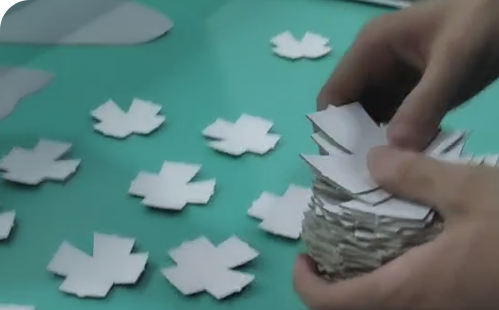
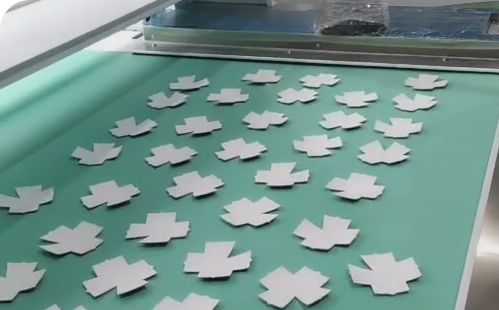
ए1: The ASP-835 Intelligent Visual Digital Printing Line Drawing Machine is a fully automatic assembly line drawing machine, suitable for high-precision line drawing before sewing various shoe materials (PU, microfiber, leather fabric, etc.). The machine uses an imported inkjet head with fine spray points to ensure the fineness and clarity of lines; it is equipped with a standard sustainable ink supply system to save consumables costs; it adopts an integrated inkjet printing mode for faster speed and higher accuracy; the material receiving platform is equipped with a drying system as standard, which can quickly and effectively dry the drawn lines to avoid problems such as line smudging and blurring. The machine can replace traditional processes such as manual line drawing and screen printing, solving the problems of low efficiency, poor precision, troublesome plate changing and environmental pollution of traditional processes, and realizing efficient and stable production.
प्रश्न 2: What is the ASP-835 used for?
ए2:यह मुख्य रूप से के लिए उपयोग किया जाता है। high-precision line drawing before sewing shoe materials. विशिष्ट कार्यों में शामिल हैं:
-
High-precision line drawing on PU shoe materials.
-
High-precision line drawing on माइक्रोफाइबर shoe materials.
-
High-precision line drawing on चमड़ा shoe materials.
-
High-precision line drawing on fabric shoe materials.
-
Replacing manual line drawing.
-
Replacing traditional processes such as screen printing.
-
Quickly drying the drawn lines through the drying system to ensure the surface quality of the material.
प्रश्न 3: What are the key technical parameters of the ASP-835?
A3:Key technical parameters of the ASP-835 are as follows:
-
मॉडल संख्या: ASP-835
-
कार्य क्षेत्र: 1800×900mm
-
Accuracy: ≤0.5mm
-
वोल्टेज: 220V/50HZ/1फेज
-
शक्ति: 4.5KW
-
मशीन का आकार: 3125×2683×2333mm
-
शुद्ध वजन: 1200 किग्रा
द काम करने का क्षेत्र संसाधित सामग्री क्षेत्र निर्धारित करता है, line drawing accuracy affects line drawing quality, शक्ति affects energy consumption, and मशीन का आकार और वजन स्थापना स्थान और हैंडलिंग को प्रभावित करता है।.
चौथा प्रश्न: What are the main features of the ASP-835?
ए4: मुख्य विशेषताएँ शामिल हैं:
-
Process advantages: Fully automatic assembly line operation replaces traditional processes such as manual line drawing and screen printing, solves the problems of low efficiency, poor precision, troublesome plate changing, environmental pollution, etc. of traditional processes, and realizes efficient and stable production.
-
Comprehensive performance advantages: Automated assembly line operation greatly shortens the production cycle and improves production capacity; energy consumption is significantly reduced compared to traditional equipment; it does not generate a large amount of waste and pollution during use.
-
Inkjet system: Imported inkjet head with fine spray points ensures fineness and clarity of lines. Standard sustainable ink supply system saves consumables costs and avoids time waste and cumbersome operation caused by frequent replacement of ink cartridge.
-
Printing mode: The integrated inkjet printing mode is faster and more accurate. Compared with the trajectory drawing method, it has obvious advantages. It can complete the drawing of a large area at one time and ensure the uniformity and consistency of the lines.
-
Supporting facilities: The material receiving platform is equipped with a drying system as standard, which can quickly and effectively dry the drawn lines to avoid problems such as line smudging and blurring, ensure the surface quality of the material, and improve the good quality product rate.
२. लागू उद्योग एवं सामग्री
प्रश्न 5:What materials can the ASP-835 process?
ए5: The ASP-835 is suitable for the following shoe materials:
-
PU
-
माइक्रोफाइबर
-
चमड़ा
-
Fabric
प्रश्न 6: What industries or factories use the ASP-835?
ए6:यह निम्नलिखित उद्योगों में व्यापक रूप से उपयोग किया जाता है:
-
जूते की फैक्ट्रियाँ
-
जूते के ऊपरी भाग की प्रसंस्करण फैक्ट्रियाँ
-
खेलकूद सामग्री कारखाने
-
चमड़े के उत्पादों की फैक्ट्रियाँ
३. कार्य एवं प्रदर्शन
प्रश्न 7: What are the features of the inkjet system on the ASP-835?
ए7:Inkjet system features include:
-
Adopts an imported inkjet head.
-
Fine spray points.
-
सुनिश्चित करता है fineness and clarity of lines.
-
Standard sustainable ink supply system.
-
Saves consumables costs.
-
Avoids time waste and cumbersome operation caused by frequent replacement of ink cartridge.
प्रश्न 8:What are the advantages of the integrated inkjet printing mode on the ASP-835?
ए8:The advantages of the integrated inkjet printing mode include:
-
Faster speed.
-
Higher accuracy.
-
Obvious advantages compared with the trajectory drawing method.
-
क्या complete the drawing of a large area at one time.
-
सुनिश्चित करता है uniformity and consistency of the lines.
प्रश्न 9: What is the function of the drying system on the ASP-835?
ए9: The main functions of the drying system include:
-
Quickly and effectively dry the drawn lines.
-
Avoid line smudging.
-
Avoid line blurring.
-
Ensure the surface quality of the material.
-
Improve the good quality product rate.
四.Startup & Operation
प्रश्न 10:What is the startup procedure for the ASP-835?
ए10:The startup procedure is as follows:
-
First turn on the main power switch.
-
Then turn on the computer switch to start up.
-
Insert the USB flash drive और copy the plate-making data to the computer.
-
Note: When shutting down after work, you must use the mouse to click the start position in the lower left corner of the computer screen and then click shutdown. Forcibly pressing the computer switch or the main power switch may cause software system crash and data loss.
प्रश्न 11:What plate-making file formats does the ASP-835 support?
A11:The ASP-835 supports the following plate-making file formats:
-
PLT
-
DXF
General plate-making files are in AI, PLT and DXF formats, and the line drawing machine only supports PLT and DXF formats. To convert file formats, use LaserCAD software. Note: The file name cannot be too long or contain special symbols such as .-, which will cause the template to not display after import.
प्रश्न 12: How to import plate-making files into the ASP-835?
ए12:The method to import plate-making files is as follows:
-
Open the folder where the plate-making file is located.
-
Select
*.PLTformat for the file type. -
Select the file for preview.
-
Check whether the shoe material matches the plate-making graphic.
-
Note: To ensure line drawing accuracy and recognition speed, check whether the internal lines of the plate-making exceed the border और check whether the plate-making border is closed.
-
Click Open, and a prompt Template added successfully will appear.
प्रश्न 13:How to test line drawing on the ASP-835?
ए13:The method to test line drawing is as follows:
-
Randomly place the test material.
-
जाँचें Precise.
-
U+: Conveyor belt feeds forward.
-
U-: Conveyor belt feeds backward.
-
Click U+ & Precise, feed to the line drawing area, select the cut piece and the corresponding plate-making file.
-
Click Template Test.
-
After the test line drawing is completed, check whether the line drawing sample is accurate.
-
If the line drawing sample is accurate, switch to automatic line drawing and it can be used normally.
五.Line Drawing Parameter Settings
प्रश्न 14: What are the general parameters of the ASP-835?
ए14:General parameters include:
-
Similarity: The higher the cut piece precision, the higher the value, the faster the recognition speed, but the lower the matching success rate. Conversely, the slower the recognition speed. Similarity generally cannot be set too low or too high.
-
Maximum overlap: The overlap of the circumscribed rectangles between templates. If the overlap between two templates is too high, missed recognition may occur, and the maximum overlap needs to be increased for matching.
-
Contrast: Recognition is performed by comparing the cut piece color with the background color. The higher the contrast, the faster the matching speed, but missed recognition may occur; the lower the contrast, the slower the matching speed, but the higher the matching success rate.
प्रश्न 15: What are the fine-tuning parameters of the ASP-835?
ए15:Fine-tuning parameters include:
-
Smoothness: The degree of deformation of the matching result in fine-tuning mode. The higher the value, the closer the matching result is to the template; the lower the value, the more the matching result fits the cut piece.
-
Deformation matching coefficient: The cut piece deformation permission value. The larger the value, the higher the material deformation permission, and the slower the recognition speed.
-
Template creation optimization: Default setting is 5, not recommended to modify.
-
Template matching optimization: Default setting is 5, not recommended to modify.
प्रश्न 16:What are the edge extraction parameters of the ASP-835?
ए16:Edge extraction parameters include:
-
Edge extraction threshold: The contrast value between the material color and the conveyor belt color. The larger the value, the greater the contrast. Default value 122.
-
Blur degree: Deburring effect. The higher the blur degree, the blurrier the edge extraction boundary, and the better the deburring effect. Default value 13.
-
Matching speed/accuracy: The larger the matching speed, the lower the accuracy; the smaller the matching speed, the higher the accuracy. Default value 9.
-
Corner setting: Reference value selected for edge extraction. Default value 7.
प्रश्न 17: What other parameter options does the ASP-835 have?
ए17:Other parameter options include:
-
Limit cut piece angle: For rectangular templates or vertically symmetrical templates, the matching may be upside down. This function fixes the matching direction of the cut piece, so that the matching will not be upside down.
-
Other template matching: This function is based on color for matching. If not checked, it is based on the outer contour of the cut piece for matching. The advantage of this function is that it matches single-color cut pieces faster, but the disadvantage is that it is not good at recognizing multi-color cut pieces.
-
Image processing: Blurs the image, which is effective for deburring.
६. समस्या निवारण
प्रश्न 18: What to do if there is a problem with cut piece recognition on the ASP-835?
ए18:Cut piece recognition problems and solutions:
-
Normal mode: For materials with standard cut pieces, such as चमड़ा.
-
Fine-tuning mode: For materials with large deformation, such as mesh tongues.
-
Edge extraction mode: For the entire shoe upper with large deformation.
-
Solution 1 (caused by cut piece deformation): Reduce template similarity. If the deformation is too large, check Fine-tuning, and adjust the fine-tuning parameters according to the deformation degree of the cut piece. Generally, after fine-tuning, the problem of inaccurate recognition can be solved. Fine-tuning will calculate the cut piece lines through software, which will take 3–12 seconds of calculation time.
-
Solution 2 (image channel mismatch problem): Click Image Channel and select the channel with a large color difference between the cut piece and the background. Select the image channel with larger contrast, for example, the legend is S या Red.
-
Professional advice: For first-time replacement or if unfamiliar with the operation, consult the brand‘s technical support for guidance.
प्रश्न 19: What to do if the line drawing on the ASP-835 is broken?
ए19:Methods for handling broken lines in line drawing:
-
According to the broken line printing position, from front to back, perform vacuum extraction treatment on the corresponding ink cartridge to solve the problem.
-
After extraction, wipe the ink cartridge contacts and nozzle dry with a paper towel.
-
Otherwise, it may corrode the circuit board.
-
The service life of the ink cartridge is 1–3 months. After eliminating the above problems, consider replacing the ink cartridge.
प्रश्न 20: What to do if the screen frame does not press down on the ASP-835?
ए20:If the screen frame does not press down, check:
-
Check whether the pressure reducing valve air pressure is normal (30–60Mpa, Note: the unit may be incorrect, कृपया निर्माता से पुष्टि करें।).
-
Check whether the screen pressing induction photoelectric switch is normal.
-
Check whether the pneumatic solenoid valve is working properly.
-
Adjust the pressure regulating valve air pressure.
प्रश्न 21: What to do if the printed line width does not match the actual line width on the ASP-835?
A21:If the printed line width does not match the actual line width, follow these steps:
-
Open TPlot software and click पैरामीटर.
-
Enter the default password: 123.
-
In the ink cartridge parameters option, modify the line width to be consistent.
-
If the data is not synchronized, the printed line width will be inconsistent with the actual line width.
प्रश्न २२: How to set dashed lines on the ASP-835?
ए22:The method to set dashed lines is as follows:
-
Open TPlot software.
-
Click Settings – Software Settings.
-
सेट करें dashed line segment length and spacing according to requirements.
-
जाँचें Enable.
-
सेट करें segment length (0.1–2mm) and spacing (0.1–10mm).
七.Maintenance & Precautions
प्रश्न २३: What should be noted when using the ASP-835?
ए23:सावधानियों में शामिल हैं:
-
Do not place stacks of shoe materials, keyboards, mice and other sundries on the conveyor belt, to avoid misoperation, being transported to the line drawing work area, and causing the print head to collide with the screen frame or sundries.
-
When replacing the ink cartridge, you must first turn off the power of the carriage board or unplug the power cable, to avoid short circuit of the ink cartridge circuit board.
-
When shutting down after work, you must use the mouse to click the start position in the lower left corner of the computer screen and then click shutdown. Forcibly pressing the computer switch or the main power switch may cause software system crash and data loss.
-
If you encounter problems that cannot be solved, you can first contact the technical personnel, connect the device to WIFI, double-click to open the Sunflower remote control software, and perform remote control.
प्रश्न २४: What to do if there is splashed ink on the conveyor belt of the ASP-835?
ए24:If there is splashed ink on the conveyor belt, possible causes are:
-
Check whether the black ink cartridge plug is tightly plugged.
-
Check whether the ink cartridge and continuous ink supply bottle are damaged.
-
Check whether the connecting hose is damaged.
-
Check whether the ink cartridge has no vacuum, and perform vacuum extraction treatment on the corresponding ink cartridge.
-
The service life of the ink cartridge is 1–3 months. After eliminating the above problems, consider replacing the ink cartridge.
八. Selection & After-sales
प्रश्न २५:How to choose the ASP-835 Intelligent Visual Digital Printing Line Drawing Machine?
ए25:निम्नलिखित कारकों के आधार पर चुनें:
-
वास्तविक उत्पादन आवश्यकताएँ: Confirm whether high-precision digital printing line drawing functions are needed.
-
सामग्री प्रसंस्करण: Confirm whether it is PU, microfiber, leather, fabric, etc.
-
कार्य क्षेत्र: पुष्टि करें कि 1800×900mm प्रक्रिया योग्य सामग्री क्षेत्र की आवश्यकताओं को पूरा करता है।.
-
Line drawing accuracy: पुष्टि करें कि ≤0.5mm प्रक्रिया की आवश्यकताओं को पूरा करता है।.
-
विद्युत की स्थिति: पुष्टि करें कि कारखाने के पास है या नहीं 220V/50HZ/1फेज शक्ति।.
-
स्थापना स्थान: पुष्टि करें कि 3125×2683×2333mm रखा जा सकता है।.
-
मशीन का वजन: पुष्टि करें कि 1200 किग्रा संभालने और भार वहन के लिए विचार की आवश्यकता है।.
-
बिक्री के बाद सहायता: पुष्टि करें कि निर्माता स्थापना मार्गदर्शन, संचालन प्रशिक्षण और बिक्री के बाद सेवा प्रदान करता है या नहीं।.
प्रश्न 26:What should I consider when buying the ASP-835?
ए26: खरीदारों को निम्नलिखित कारकों पर विचार करना चाहिए:
-
कार्य क्षेत्र: कि 1800×900mm प्रक्रिया योग्य सामग्री क्षेत्र की आवश्यकताओं को पूरा करता है।.
-
Line drawing accuracy: कि ≤0.5mm प्रक्रिया की आवश्यकताओं को पूरा करता है।.
-
वोल्टेज: कि 220V/50HZ/1फेज स्थानीय विद्युत शर्तों को पूरा करता है।.
-
शक्ति: कि 4.5KW उत्पादन की जरूरतों को पूरा करता है।.
-
मशीन का आकार: कि 3125×2683×2333mm स्थापना स्थान में फिट बैठता है।.
-
शुद्ध वजन: कि 1200 किग्रा संभालने और भार वहन के लिए विचार की आवश्यकता है।.
-
Print head and ink cartridge: Confirm print head model, ink cartridge type and capacity, and sustainable ink supply system capacity.
-
Drying system: Confirm drying system power and temperature range.
-
स्पेयर पार्ट्स की उपलब्धता: Confirm supply of print head, ink cartridge, circuit board and other consumables.
-
बिक्री के बाद सहायतास्थापना मार्गदर्शन, संचालन प्रशिक्षण और बिक्री के बाद सेवा की पुष्टि करें।.
-
वितरण समय और वारंटी अवधि: डिलीवरी समय और वारंटी नीति की पुष्टि करें।.
प्रश्न 27:Can the ASP-835 be customized?
ए27:उपलब्ध जानकारी के आधार पर, यह है। not fully possible to confirm whether the ASP-835 supports customization. Possible customization directions include:
-
कार्य वोल्टेज
-
कार्य क्षेत्र
-
Print head configuration
-
Ink cartridge type
-
Drying system
-
दिखाई देने वाला रंग
अनुकूलन के लिए, कृपया सीधे निर्माता से पुष्टि करें।. अनुकूलन से पहले स्पष्ट करें production needs, material types, working area requirements, line drawing accuracy requirements and installation space.
प्रश्न 28:What is the difference between the ASP-835 and ASP-833?
ए28:Based on the available information, the technical parameters and applications of the ASP-835 and ASP-833 are basically the same, including:
-
कार्य क्षेत्र: Both are 1800×900mm.
-
Line drawing accuracy: Both are ≤0.5mm.
-
वोल्टेज: Both are 220V/50HZ/1फेज.
-
शक्ति: Both are 4.5KW.
-
मशीन का आकार: Both are 3125×2683×2333mm.
-
शुद्ध वजन: Both are 1200 किग्रा.
-
Application and features: Basically the same.
The specific differences need to be confirmed with the manufacturer, which may involve print head configuration, ink cartridge type, drying system or other internal configuration differences.
प्रश्न 29:क्या निर्माता स्थापना और तकनीकी सहायता प्रदान करता है?
ए29:निर्माता निम्नलिखित सेवाएँ प्रदान कर सकता है:
-
स्थापना मार्गदर्शन
-
आयोगन सहायता
-
संचालन प्रशिक्षण
-
बिक्री के बाद सेवा
-
स्पेयर पार्ट्स की आपूर्ति
-
Remote control support (Sunflower software)
विशिष्ट सेवा का दायरा आदेश और क्षेत्र पर निर्भर करता है. कृपया खरीद से पहले आपूर्तिकर्ता से पुष्टि करें। स्पष्ट करना अनुशंसित है। स्थापना, प्रशिक्षण, वारंटी और स्पेयर पार्ट्स की आपूर्ति खरीद अनुबंध में।.