
ASFROM Insole Logo Transfer Machine FAQ
ASFROM Insole Logo Transfer Machine FAQ
Insole Logo Transfer Machine Base Q&A
I. Grundlegende Produktinformationen
Q1: What is AF‑IM02 Automatic Insole Transfer Printing Machine?
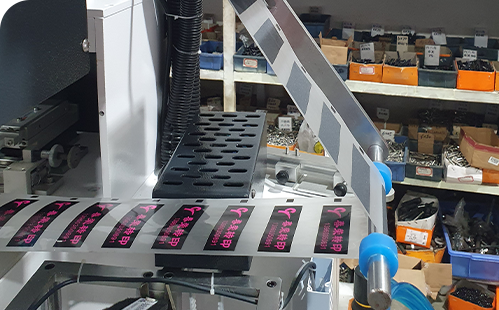
A1: AF‑IM02 (Dual‑Foot) Automatic Insole Transfer Printing Machine is upgraded version of AF‑IM01 single‑foot model, fully‑automatic pneumatic transfer equipment dedicated for insoles. It adopts PC+HMI touch‑screen control system, equipped with automatic gripper loading/unloading, secondary positioning correction and label‑film tension control. Unique synchronous double‑station hot stamping completes left‑foot and right‑foot insoles in one cycle, production capacity increased by 100% compared with single‑foot model for mass automatic trademark stamping in shoe factories.
Q2: What are the core technical parameters of AF‑IM02 Automatic Insole Transfer Printing Machine?
A2:The core parameters are as follows:
1.Model No.: AF‑IM02
2.Voltage: 220V/50HZ 1‑Phase
3.Current: 4.5A
4.Total power:1KW
5.Working air pressure:5‑6kg/cm²,recommended
5.5kg/cm²
6.Machine dimension:1000×700×1800mm
7.Net Weight:250KG
Q3: What are the main features of AF‑IM02 Automatic Insole Transfer Printing Machine?
A3:
1.PC intelligent control system with high‑resolution HMI touch screen for visualized operation. Pages include operation page, parameter page, manual commissioning page, I/O status monitoring and alarm message page. It supports production counter. Each actuator can be tested independently under manual mode, with automatic fault alarm notification.
2.Precision pneumatic actuators. High‑precision pneumatic components drive all movements for fast response and stable running performance.
3.Fully‑automatic loading‑unloading system. Intelligent gripper automatically picks, transfers and collects insoles to reduce manual labor.
4.Dual secondary precision positioning system combining pre‑positioning and photo‑electric fine adjustment to achieve zero stamping position deviation. Positioning function can be disabled for higher throughput.
5.Dynamic tension control for label film. Label‑pulling motor automatically tensions and flattens transfer film to prevent graphic distortion and guarantee clear and complete printing result.
6.Synchronous double‑station hot stamping technology. Left‑foot and right‑foot insoles can be stamped simultaneously. Double workpieces are finished in one cycle, capacity increased by 100% versus single‑foot model.


II. Anwendbare Branchen und Werkstoffe
Q4:What products and materials can AF‑IM02 Automatic Insole Transfer Printing Machine process?
A4:Specially used for trademark heat‑transfer stamping of various insoles, compatible with insole heat‑transfer label film.
Q5: What production scenarios is AF‑IM02 Automatic Insole Transfer Printing Machine mainly used for?
A5:Applied in shoe‑making factories and insole processing plants, suitable for high‑volume automatic heat‑transfer production of insole trademarks.
三. Utility, Installation & Commissioning
Q6: What utility conditions are required for AF‑IM02 Automatic Insole Transfer Printing Machine?
A6:Power supply:220V 50Hz single‑phase, reliable protective earthing is mandatory. Air supply: external compressed air source, working pressure 5‑6kg/cm², recommended 5.5kg/cm². Reserve sufficient space for operation and maintenance.
Q7: What are requirements for installation & placement of AF‑IM02 Automatic Insole Transfer Printing Machine?
A7:Place machine on flat hard floor. Lock castor brakes after installation to avoid shifting and shaking during operation. Keep clearance around machine for maintenance. Keep away from humid and heavy‑dust environment.
Q8:What is complete test‑running operating procedure for AF‑IM02 Automatic Insole Transfer Printing Machine?
A8:
1.Confirm reliable earthing, connect compressed‑air pipe, adjust air pressure and lock castor brakes.
2.Power on, go to parameter page and set process parameters including temperature, pressing time, traverse speed, transfer stepping speed, gripper pick/release time and positioning time.
3.Switch to manual page, test cylinders, motors and transfer‑alignment action individually, complete photo‑electric alignment calibration.
4.Confirm all home‑position signals are activated on I/O monitoring page.
5.Enter operation page and switch on label‑pulling motor. Run trial production to verify synchronous stamping position and printing quality for left & right insoles.
6.Start auto‑mode mass‑production after trial run acceptance. Enable or disable secondary positioning as required. Machine realizes simultaneous stamping for left‑foot and right‑foot insoles.
7.Execute 【Full Reset】 after emergency‑stop or fault. Auto‑run can only be restarted after reset completion.
Q9: What precautions for air‑pressure adjustment?
A9:Standard working air pressure ranges 5‑6kg/cm², recommended value 5.5kg/cm². Too low pressure causes weak cylinder movement and unstable gripping. Excessively high pressure accelerates pneumatic component wear. Due to higher load of dual‑station design, inspect air‑source pressure periodically during production.
IV. Maschinenaufbau und Komponenten
Q10: What are the 5 core assemblies of AF‑IM02 Automatic Insole Transfer Printing Machine?
A10:5 modular core assemblies:
1.Mechanical frame assembly; 2.Pneumatic actuator unit; 3.Insole feeding & collecting assembly; 4.Transfer‑film feeding & positioning mechanism; 5.PC touch‑screen electrical control system.
‑Mechanical frame: main frame, castor brakes, dual‑station index plate.
‑Pneumatic actuator unit: dual‑station pressing cylinders, needle‑claw cylinder, positioning cylinder and pneumatic valve banks.
‑Insole feeding & collecting assembly: dual feeding hoppers, receiving hopper, optical‑fiber level sensor, proximity limit switches.
‑Transfer‑film feeding & positioning mechanism: label‑pulling motor, tension unit, photo‑electric alignment sensor.
‑PC touch‑screen electrical control system: HMI touch panel, I/O signal acquisition module, alarm unit, production counter module.
Q11: What advantages does synchronous double‑station hot stamping bring?
A11:The machine can finish hot stamping for left‑foot and right‑foot insoles within one working cycle. Production capacity is increased by 100% compared with AF‑IM01 single‑foot model. It fits high‑volume insole orders with consistent positioning accuracy for both left and right insoles.
Q12: What are functions of optical‑fiber level sensor?
A12:Mounted on feeding hopper for insole level detection. Hopper will stop rising automatically when insole is 2‑5 mm away from optical‑fiber sensor to avoid insole damage. Clean dust on sensor surface regularly.
五.Safety, Maintenance & Troubleshooting
Q13: What safety notes for AF‑IM02 Automatic Insole Transfer Printing Machine?
A13:
1.The whole machine must be reliably earthed against electric‑shock hazard.
2.Do not place hands into moving zones of cylinders, dual‑station pressing mould and index plate during operation to prevent pinching or crushing injury.
3.Switch to manual mode for commissioning and inspection. Cut off power and air supply before maintenance work.
4.Full reset must be executed after emergency‑stop. Confirm all mechanisms return to home position before restarting auto‑production.
5.Keep compressed‑air source dry to avoid water‑induced damage to pneumatic components. Check air‑pipe joint sealing regularly for higher load of dual‑station model.
Q14: What is maintenance schedule for AF‑IM02 Automatic Insole Transfer Printing Machine?
A14:Per shift: Clean residues inside hoppers; confirm stable air pressure; check alarm messages; keep optical‑fiber and proximity sensors dust‑free.
Weekly: Inspect air pipe for leakage; test movement of all dual‑station cylinders; calibrate photo‑electric alignment sensor position; verify emergency‑stop & reset function.
Every half‑year: Inspect pneumatic fittings and solenoid valves; check cylinder seals and replace if needed; fasten electrical terminals.
Yearly: Complete machine overhaul. Evaluate wear status of pneumatic parts and replace aged components.
Q15: Common faults and troubleshooting guidelines?
A15:
- Cannot start auto mode: Go to I/O status page and confirm home‑position signals of index plate, pick‑up cylinder upper limit, pressing cylinder upper limit and positioning cylinder are activated. Read fault codes in alarm window.
- Trademark stamping position offset (single‑side or both‑side): Re‑run transfer alignment, adjust photo‑electric alignment sensor, inspect dual‑station pressing cylinders and secondary‑positioning cylinder movement and verify process parameters.
- Wrinkled or distorted printed label: Make sure label‑pulling motor is switched on, adjust transfer stepping speed and inspect label‑film tension mechanism.
- Feeding hopper fails to stop rising automatically: Adjust distance between optical‑fiber sensor and insole side face to 2‑5 mm, clean dust on sensor lens.
- Weak cylinder movement: Verify air pressure reaches 5‑6kg/cm², check pipe leakage and inspect solenoid‑valve malfunction.
六.Model Selection
Q16: Which customers are suitable for AF‑IM02 Automatic Insole Transfer Printing Machine?
A16:Recommended for shoe factories and insole manufacturers requiring high‑volume insole trademark heat transfer, scenarios pursuing automation, labor saving, high positioning accuracy and simultaneous processing for left‑right insoles. It is dedicated only for insole label transfer and not suitable for general fabric heat‑press work. Select HP2‑40×60, HP‑38 or H‑SD09‑38 universal heat‑press series for common fabric processing. Choose AF‑IM01 single‑foot model for lower‑volume production.